

From autumn 2025, all company directors and people with significant control (PSCs) must verify their identity with Companies House under new laws to combat corporate crime.
Don’t wait—verify now and stay ahead of the legal deadline.
UPDATE: Companies House have confirmed that the verification process will become mandatory from 18th November 2025 – see the Companies House announcement for further information.
Verifying your identity with Companies House
You can verify your identity with Companies House in 3 ways:
- Online via GOV.UK One Login – if you have the required ID documents or details
- In person at select UK Post Offices – check eligibility first using the ‘Verify your identity for Companies House’ service
- Through an authorised agent (ACSP) – such as a registered accountant or solicitor, with valid ID documents
As Chartered Accountants, we are able to carry out identity verification checks on behalf of our clients. However, this process requires the use of third-party software, which incurs an additional cost for our clients. For a quicker and cost-free alternative, we recommend using the GOV.UK One Login service — it’s straightforward and typically takes just 10 to 20 minutes to complete.
A Step-by-Step Guide: Verifying Your Identity with Companies House via GOV.UK One Login
We recommend that Directors and PSCs use the free identity checking service provided by GOV.UK One. We have provided screenshots of each step in this guide. Please be aware that the steps may be different as it will depend on many factors including devices used.
Total Time Needed:
15
Minutes
Total Cost:
£Nil –
It is completely FREE
Required Tools:
Things Needed:
– Year moved into current home address
– Personal details such as email address, home address, date of birth
Visit the official GOV.UK identity verification guidance page at:
https://www.gov.uk/guidance/verify-your-identity-for-companies-house.
The homepage will guide you through the steps required to begin the process.

You will first be asked to confirm that you hold an accepted form of photo identification, such as a valid UK passport. You will then be directed to create a GOV.UK One Login account.

Provide your email address and click Continue. A 6-digit security code will be sent to the email address you provided. Enter the code to verify your email.

Set a strong password for your GOV.UK One Login account. Please ensure you remember both your email address and password, as they will be required for future access.

For added security, you will be prompted to set up two-factor authentication. You can choose between receiving a code via text message or using an authenticator app. Both options are straightforward and enhance the security of your account.

Once you’ve completed the above steps, your GOV.UK One Login account will be active. You can now continue with the identity verification process required by Companies House.

You will be prompted to log in using the email and password you just created. Complete the two-factor authentication to continue.

You’ll be asked whether you’ve previously verified your identity with Companies House. Select No to begin the process.

A series of questions will be presented to tailor your verification pathway. These typically include:
– Your country of residence (e.g., UK or elsewhere)
– Type of photo ID (e.g., passport, driving licence)
– Device being used (e.g., computer, tablet, smartphone)
Based on your answers, further questions may appear. For example, if you select “passport,” you may be asked whether it includes a biometric chip. If using a smartphone, you may need to specify the make and model.

Based on the responses in Step 9, you will be assigned a verification method. In our experience, this involved verifying identity via a mobile app and UK passport. Your process may vary slightly.

Using your smartphone, scan a QR code to download the designated identity verification app. The app will guide you through the following steps:
– Photograph your passport using the camera on your phone
– Scan your passport chip by placing your phone on top of the passport
– Capture a selfie for facial recognition
Instructions within the app are clear and easy to follow.

Once the three steps in the app are completed, you should receive confirmation that your identity has been successfully verified.
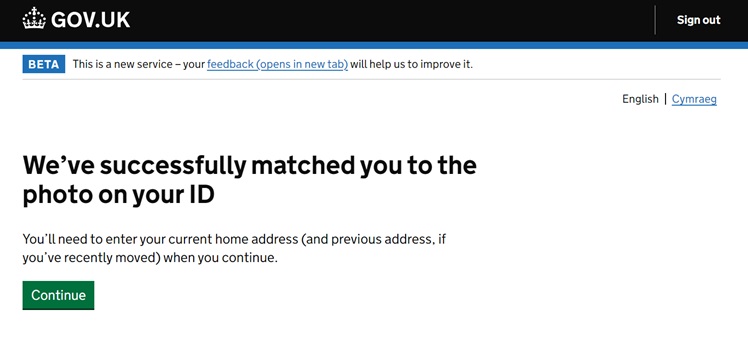
You will now be asked to enter your residential address. Start by entering your UK postcode, then select the correct address from the dropdown list. You’ll also need to provide the year you began living at this address.

After submitting your address, the system will take approximately 30 seconds to validate your information. You should then receive confirmation that your identity has been successfully verified.

Upon successful completion, you will be shown a screen containing your personal verification code. This code will be required by Companies House from Autumn 2025, so please ensure it is stored securely.

Completing this process in advance ensures you’re well prepared for the upcoming regulatory changes. If you have any questions or need further assistance, please don’t hesitate to contact ourselves.
What happens if you don’t complete an identity verification
Failure to complete identity verification on time means you and any other unverified directors will be unable to file your company’s confirmation statement or other documents.
It is also a legal offence and may result in penalties, including fines and restrictions on forming new companies.
Further Information on identity verification with Companies House
For further information Read the Companies House Guidance.
Related Links:
- What is the Optimum Directors Salary?
- Employers NI Increase – Calculate how much extra your business will pay
- Tax Codes Explained – What Your Tax Code Means?
- Spring Statement 2025 – How it affects You and Your Business
- National Minimum Wage – The new rates from April
DISCLAIMER – Please note that the content contained in this article is for general information only and is not a substitute for professional advice – read our full disclaimer